Check batteries. Configure the TASCAM PORTACAPTURE 6X RECORDER
POWER > MENU > LAUNCHER > MANUAL
MENU > GENERAL SETTINGS > REC SETTINGS
file format: WAV
sample: 48kHz
bit depth: 32bit float
rec pause: on
auto rec: off
dual rec: off
I/O SETTINGS
phantom: +48V
plug in power: off
mic trim: 0dB
speaker: off
ms decode: off
reverb: off
SYSTEM
date/time: (file names include the date)
media format > erase format (clears the MicroSD card of all data)
Before the first take:
MENU > LAUNCHER > MANUAL
MENU > INPUTSELECT
Set TRACK 1-2 to INPUT 3-4
Back to HOME window. Select INPUT window
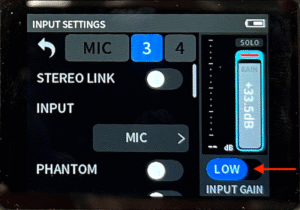
Select MIC ICON 3 > INPUT SETTINGS.
Disable STEREO LINK. Set INPUT GAIN. Set PHANTOM power. Disable AUTO GAIN. Disable LOW CUT
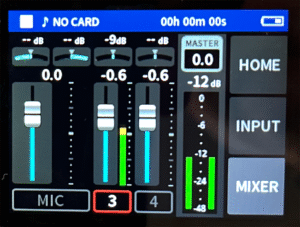
Back to INPUT window. Select MIXER window. Select MASTER. Set to MONO.
Press REC once to enter pause mode.
POSITION THE MIC as close as the frame edge allows, PICK-UP PATTERN HOT SIDE facing actor(s). Rehearse with actors. Monitor DX levels from the MIXER window, targeting between -20 and -12dB. Select FADER 3. Use WHEEL to make fine adjustments of mixer fader and input level settings. Press REC a second time to record.
Record one minute of ROOM TONE. LOG file number.
MENU > BROWSE to PLAYBACK each recording, monitoring for quality